Mon–Sat 10 AM – 6 PM · Sun closed 4146 W Camelback Rd, Phoenix, AZ 85019 Financing available

Sound Image · Phoenix, AZ

Backup Camera & Dash Cam Installation in Phoenix, AZ

Backup cameras have been required on new passenger vehicles built since May 2018, but millions of cars and trucks on the road are older than that. We add rear, front and side cameras to vehicles of any age, and we install dash cams that record your drive and keep watch while you’re parked. Everything is wired cleanly and, in most vehicles, connected to the screen you already have or to a new receiver.

Backup Cameras & Dash Cams at Sound Image in Phoenix, AZ
  • Rear, front and side cameras
  • Third-brake-light cameras for towing
  • Hardwired dash cams with parking mode
  • Heat-ready supercapacitor dash cams
  • Works with factory or aftermarket screens

Rear, front and side cameras

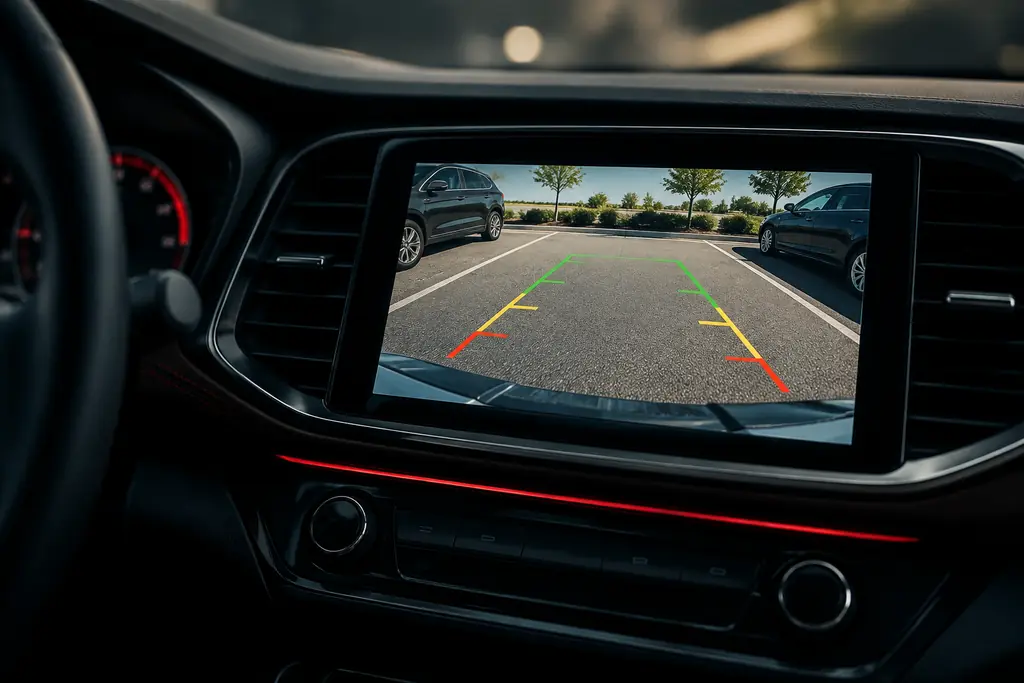
A rear camera takes the guesswork out of tight parking spots, driveways and crowded lots. We mount it where it looks factory, in the license plate area, tailgate handle or bumper, and wire it to switch on automatically when you shift into reverse.

Lifted trucks and Jeeps have big blind spots up front. A front camera shows curbs, posts and low obstacles you can’t see over the hood, and side cameras help with lane changes, trailers and tight trails. Towing? A third-brake-light camera helps you line up a hitch and keep an eye on your trailer.

Every camera is aimed and leveled so parking guidelines are accurate, and cables run behind trim panels where they stay protected. Pick a camera with good low-light performance, too; backing out of an unlit driveway at night is when you need it most.

  • License plate, tailgate handle and bumper cameras
  • Front cameras for lifted trucks and Jeeps
  • Side and blind-spot cameras
  • Third-brake-light cameras for towing
  • Mirror monitors for vehicles without a screen
Dash cams built for Phoenix heat

Heat is a dash cam’s biggest enemy in Arizona. Cameras with lithium batteries can swell or fail after a few summers on the windshield. We recommend dash cams that use supercapacitors instead, because they’re designed to handle high temperatures.

Use a high-endurance microSD card, too. Standard cards wear out quickly with constant recording, and heat speeds that up. We’ll set up the camera and show you how to check and format the card.

Mounting matters as well. We tuck the camera behind the rearview mirror, out of the most direct sun and out of your line of sight, and route the cable through the headliner and pillar trim, clear of side-curtain airbags.

Hardwired parking mode

A hardwired dash cam connects to your fuse box, so it powers on with the car and there’s no cord dangling to the power outlet. In parking mode, it keeps watch while you’re away and records bumps, break-ins and hit-and-runs.

The hardwire kit monitors battery voltage and shuts the camera off before your battery runs too low to start the car. That matters in Phoenix, where heat already shortens battery life.

For full coverage, add a rear dash cam. Front-and-rear systems record both ends of the car, which helps if you’re rear-ended in stop-and-go traffic on I-17.

Works with the screen you have

Most aftermarket receivers include a rear camera input, and some accept two cameras so you can switch between front and rear views. We can add a camera during a new Apple CarPlay or Android Auto install in the same visit. In many vehicles with a factory screen, a camera interface lets a new camera display on the original screen; we work with brands like Crux for this. No screen at all? A mirror monitor works well.

Our shop sits on West Camelback Road, easy to reach from Glendale and Maryvale. Get a free quote by phone or stop by.

Brands we work with for backup cameras

Brands with a red dot are on our Phoenix showroom shelves right now. Ask us about availability for anything else.

  • Kenwood
  • Alpine
  • Pioneer
  • JVC
  • Crux

The process

How we handle your backup cameras

  1. 01

    Plan your coverage

    We talk about what you need to see and record, check your screen options and recommend cameras with a free quote.

  2. 02

    Mount the cameras

    Cameras go in clean, factory-looking locations, aimed and leveled so guidelines and recordings are actually useful.

  3. 03

    Wire it right

    We route cables behind trim, connect reverse triggers and hardwire dash cams with a low-voltage cutoff to protect your battery.

  4. 04

    Test and set up

    We test reverse and parking mode, set up the app and recording settings, and show you how to save and review footage.

FAQ

Backup Cameras & Dash Cams questions

Can you add a backup camera to my factory screen?

Often, yes. Many vehicles with a factory display can accept a camera through a vehicle-specific interface module. If your screen can’t take a camera input, we can install a mirror monitor or a new receiver with a camera input. Tell us your year, make and model, and we’ll confirm the options and give you a free quote.

Will a hardwired dash cam drain my battery?

Not when it’s installed correctly. A hardwire kit monitors battery voltage and shuts the camera off before the battery gets too low to start the car. Summer heat is already tough on batteries in Phoenix, so we set the cutoff with a safe margin. If you rarely drive, ask about limiting parking mode to a set number of hours.

Which dash cams handle Arizona heat?

Look for a dash cam that uses a supercapacitor instead of a lithium battery and carries a high operating temperature rating. Pair it with a high-endurance microSD card and use a windshield sunshade when you can. We’ll recommend models designed for hot climates and mount them behind the rearview mirror, out of the most direct sun.

How long does a backup camera installation take?

A rear camera connected to an existing receiver usually takes about 1–2 hours. Trucks with long cable runs, front and side cameras, or factory-screen integration can take longer. A hardwired front dash cam typically takes about an hour. We’ll give you a time estimate when you book.

Do I need a new stereo to add a backup camera?

No. If your current radio has a camera input, we connect to it. If it doesn’t, a rearview mirror monitor or a small add-on screen works well. And if you’ve been wanting Apple CarPlay or Android Auto anyway, a new receiver with a camera input gives you both upgrades in one visit.

Sound Image · Phoenix, AZ

Ready for backup cameras? Let's get you booked.

Stop by 4146 W Camelback Rd, call us, or book online in under a minute. Free quotes, financing available, Mon–Sat 10 AM – 6 PM · Sun closed.