
Mon–Sat 10 AM – 6 PM · Sun closed 4146 W Camelback Rd, Phoenix, AZ 85019 Financing available

Sound Image · Phoenix, AZ

Apple CarPlay & Android Auto Installation in Phoenix, AZ

You don’t need a new car to get Apple CarPlay or Android Auto. We install CarPlay and Android Auto receivers in cars, trucks and SUVs of almost any age, from late-model commuters to older work trucks that still run strong. Your maps, music, podcasts and messages move to a big touchscreen you can control by voice. Choose wired or wireless, add a backup camera and keep your steering-wheel buttons.

Apple CarPlay & Android Auto at Sound Image in Phoenix, AZ
  • Wired and wireless CarPlay and Android Auto
  • Upgrades for older cars, trucks and SUVs
  • Backup camera input on most receivers
  • Steering-wheel controls retained
  • Most installs done in about 2–3 hours

Wired or wireless?

Wired CarPlay and Android Auto connect through a USB cable. Your phone charges the whole time, the connection is rock solid, and wired receivers are usually the more budget-friendly choice.

Wireless connects over Bluetooth and Wi-Fi as soon as you start the car, so your phone can stay in your pocket or bag. It’s the easy choice for short trips around town. On long drives, plug in anyway, because wireless projection uses more battery. Wireless CarPlay works with iPhones, and wireless Android Auto works with most recent Android phones. We’ll confirm your phone is compatible before you choose.

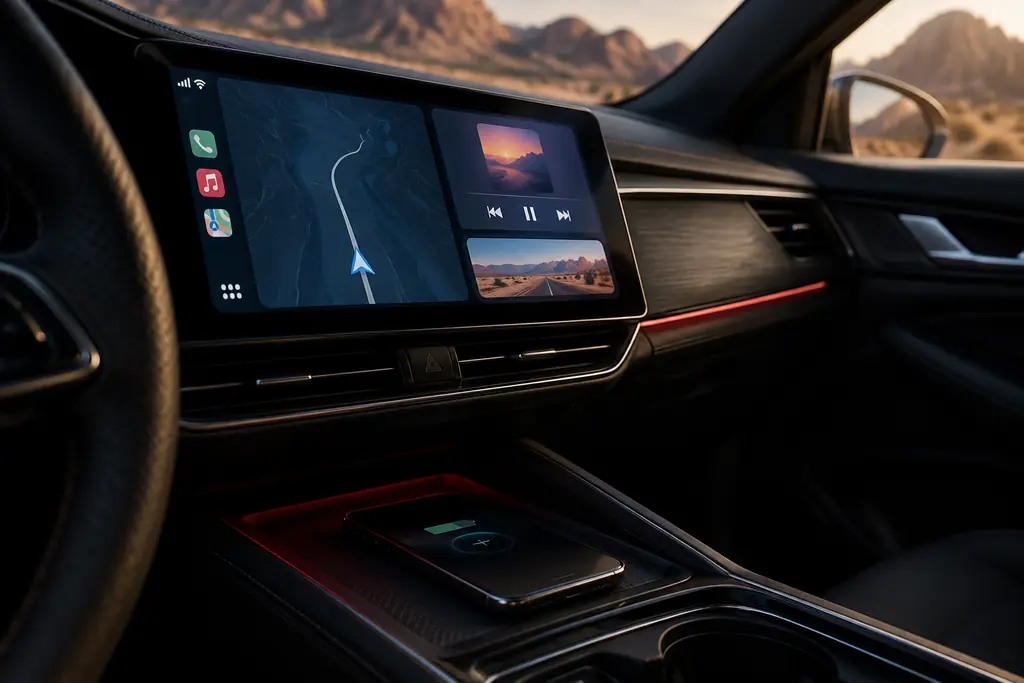
Either way, your phone can ride in the console instead of on a windshield mount. That matters in July, when a phone baking on a sunny dash can overheat and shut down right when you need directions.
Screens you can see in Arizona sun

Glare is a real problem in Phoenix, especially heading east on Camelback in the morning or west on I-10 at sunset. We’ll help you pick a bright, responsive touchscreen with good viewing angles. Many floating-screen models can be tilted to cut reflections, and we position every screen with your windshield and seating position in mind.

Choose a capacitive screen. It responds to a light touch like your phone does, which is easier to use at freeway speed than an older resistive panel. Automatic dimming and dark themes keep the display easy on your eyes after dark.

Great for older cars and trucks

Many vehicles from the 2000s and early 2010s have a standard single-DIN or double-DIN radio opening, which makes them great candidates for a CarPlay upgrade. We use vehicle-specific dash kits and wiring interfaces so the new receiver looks factory-installed and your steering-wheel controls keep working. Older trucks and SUVs are especially good candidates: the engine and body still have plenty of life, and a modern touchscreen makes the whole cab feel newer.

Some newer vehicles have a factory screen built into the dash. In many of those, a vehicle-specific receiver kit or an integration module can still add CarPlay or Android Auto. Give us your year, make and model, and we’ll tell you what’s possible.

  • Siri and Google Assistant voice control
  • Google Maps, Waze and Apple Maps on the big screen
  • Spotify, Apple Music, podcasts and audiobooks
  • Hands-free calls and read-aloud texts
  • No satellite radio subscription needed

Add a backup camera in the same visit

Most CarPlay and Android Auto receivers have a rear camera input that switches to the camera automatically when you shift into reverse. Adding the camera during the same appointment saves a second trip and a second round of taking the dash apart. We run the camera cable behind trim panels, so it stays protected and out of sight. Want to record the road ahead too? We install dash cams with parking mode as well.

We’re on Camelback Road near 43rd Avenue, a quick trip from Maryvale, Grand Canyon University and I-17. Get a free quote, and ask about financing and lease-to-own options.

Brands we work with for carplay/android

Brands with a red dot are on our Phoenix showroom shelves right now. Ask us about availability for anything else.

  • Kenwood
  • Alpine
  • Pioneer
  • Sony
  • JVC
  • iDatalink Maestro

The process

How we handle your carplay/android

  1. 01

    Check your vehicle

    Give us your year, make and model. We confirm the dash opening, factory features and parts needed, then give you a free quote.

  2. 02

    Choose your receiver

    Pick wired or wireless, screen size and extras like a backup camera input. Kenwood, Alpine and JVC all offer strong options.

  3. 03

    Clean install

    We fit the dash kit, wire the harness and interfaces, place the microphone and put the USB port where you want it.

  4. 04

    Pair and test

    We pair your phone, test CarPlay or Android Auto, calls, camera and steering-wheel controls, and show you the key settings.

FAQ

Apple CarPlay & Android Auto questions

How long does a CarPlay or Android Auto install take?

Most wireless CarPlay and Android Auto installs take about 2–3 hours depending on the vehicle. A simple double-DIN swap can be quicker. Vehicles with factory amplifiers, steering-wheel control interfaces, backup cameras or complex dashes take longer. We’ll give you a time estimate when you book so you can plan your day.

Can I add CarPlay to an older car?

Usually, yes. If your car has a standard radio opening, or one we can adapt with a dash kit, we can install a CarPlay and Android Auto receiver. Vehicles from the 2000s and early 2010s are often perfect candidates, because the rest of the car still has years of life left. Tell us what you drive and we’ll confirm the fit.

Does wireless CarPlay drain my phone battery?

It uses more battery than a wired connection, because your phone streams the display to the receiver over Wi-Fi. For short trips around Phoenix, it’s rarely an issue. On longer drives, plug in or add a charging pad. In summer, keep the phone out of direct sun, since heat drains batteries faster and can pause charging.

Do I need satellite radio or a special data plan?

No. CarPlay and Android Auto run on the apps and data already on your phone, so Spotify, Apple Music, podcasts and streaming radio all play through the new receiver. There’s no satellite tuner or separate subscription required for the receiver itself. Many models also include an HD Radio tuner for clearer local stations.

Will I be able to see the screen in bright sun?

Yes, with the right receiver and placement. Look for a bright capacitive screen with good viewing angles, and consider a floating screen you can tilt to cut reflections. We’ll help you compare models and choose a mounting position that works with your windshield and the afternoon sun.

Sound Image · Phoenix, AZ

Ready for carplay/android? Let's get you booked.

Stop by 4146 W Camelback Rd, call us, or book online in under a minute. Free quotes, financing available, Mon–Sat 10 AM – 6 PM · Sun closed.